Audio Transcription to Text Made Simple
Turning spoken words from an audio or video file into written content is what we call audio-to-text conversion. Think of it as the key to making information searchable, accessible, and ready to be repurposed. It's how you take a podcast, a meeting, or a lecture and transform it into a valuable written asset.
Why Audio Transcription Is a Modern Necessity
We're surrounded by spoken content—podcasts, video calls, online courses, you name it. While this audio-first world is incredibly engaging, it comes with one big catch: you can't easily search or scan any of it. This is precisely where audio transcription to text steps in, building a much-needed bridge between spoken ideas and a written record.
This isn't just a niche tool for journalists or lawyers anymore. It's become a go-to solution in countless fields for some very practical reasons.
Unlocking Content and Data
If you're a content creator, transcribing a video or podcast is your first step toward getting noticed. Search engines can't "watch" your video, but they can definitely crawl text. A full transcript makes every word you say indexable, which can massively boost your discoverability.
On the other side of the coin, researchers and marketers lean on transcription to make sense of qualitative data. Trying to find key moments by scrubbing through hours of interview recordings is a nightmare. A text document, however, can be searched in seconds for keywords, recurring themes, and crucial customer feedback.
Transcripts transform passive audio into active data. They allow you to search, analyze, and extract insights that would otherwise remain hidden within a recording, turning conversations into actionable intelligence.
Expanding Accessibility and Reach
Beyond just data, transcription is fundamental to digital accessibility. It provides a vital alternative for individuals who are deaf or hard of hearing, ensuring everyone has equal access to the same information. It's also a huge help for non-native speakers who might find it easier to read along as they listen.
Just think about these everyday situations where audio transcription to text is a game-changer:
- Students: Turning lecture recordings into text notes makes studying and reviewing a thousand times easier.
- Businesses: Creating searchable archives of important meetings and webinars means no critical detail ever gets lost.
- Podcasters: Repurposing a single episode into a detailed blog post, social media snippets, and email newsletters.
At the end of the day, converting audio to text isn't just a technical chore. It's a strategic decision to make your information more useful, inclusive, and valuable for everyone involved.
Choosing the Right Transcription Method for Your Project
Figuring out the best way to turn your audio into text isn't a one-size-fits-all deal. The right choice really hinges on what you need the final transcript for. A podcaster who just wants a rough draft for a blog post has completely different needs than a lawyer who requires a flawless, certified transcript for a court case.
Ultimately, your decision will be a balancing act between accuracy, speed, and what you're willing to spend. Let's break down the main ways to get it done.
The Human Touch: Manual Transcription
When accuracy is non-negotiable, nothing beats a professional human transcriber. People are brilliant at navigating tricky accents, making sense of overlapping conversations, and catching subtle nuances in language that software often fumbles.
This is the only real option for high-stakes projects like:
- Legal proceedings, where capturing every single word, pause, and stammer is critical.
- In-depth research interviews, especially with poor audio or several people speaking over each other.
- Medical notes and dictations that are full of complex, specialized terms.
The trade-off? It's the most expensive route and takes the longest. But for that investment, you're getting unmatched quality and genuine human comprehension.
The Need for Speed: Automated AI Transcription
If you need a transcript yesterday and are working on a tight budget, AI-powered software is your best friend. These tools are incredibly fast, turning hours of audio into a text file in a matter of minutes, and they cost significantly less than hiring a person.
This efficiency is why the global audio transcription market is expected to hit a massive $12.8 billion by 2033, as more people look for quick ways to repurpose their content. You can dive deeper into the numbers in this market growth analysis.
AI is perfect when "good enough" is all you need. Think about transcribing a webinar to pull out key takeaways or turning a long lecture into searchable study notes. Just be aware that accuracy can take a hit with background noise, thick accents, or a lot of technical jargon.
Pro Tip: My go-to strategy is to run audio through an AI service first to get a fast, cheap draft. Then, I'll have a human (or myself) clean it up. This hybrid approach gives you the best of both worlds—speed and affordability upfront, with a final layer of human polish for accuracy.
This chart can help you see which path makes the most sense based on your project's specific demands.
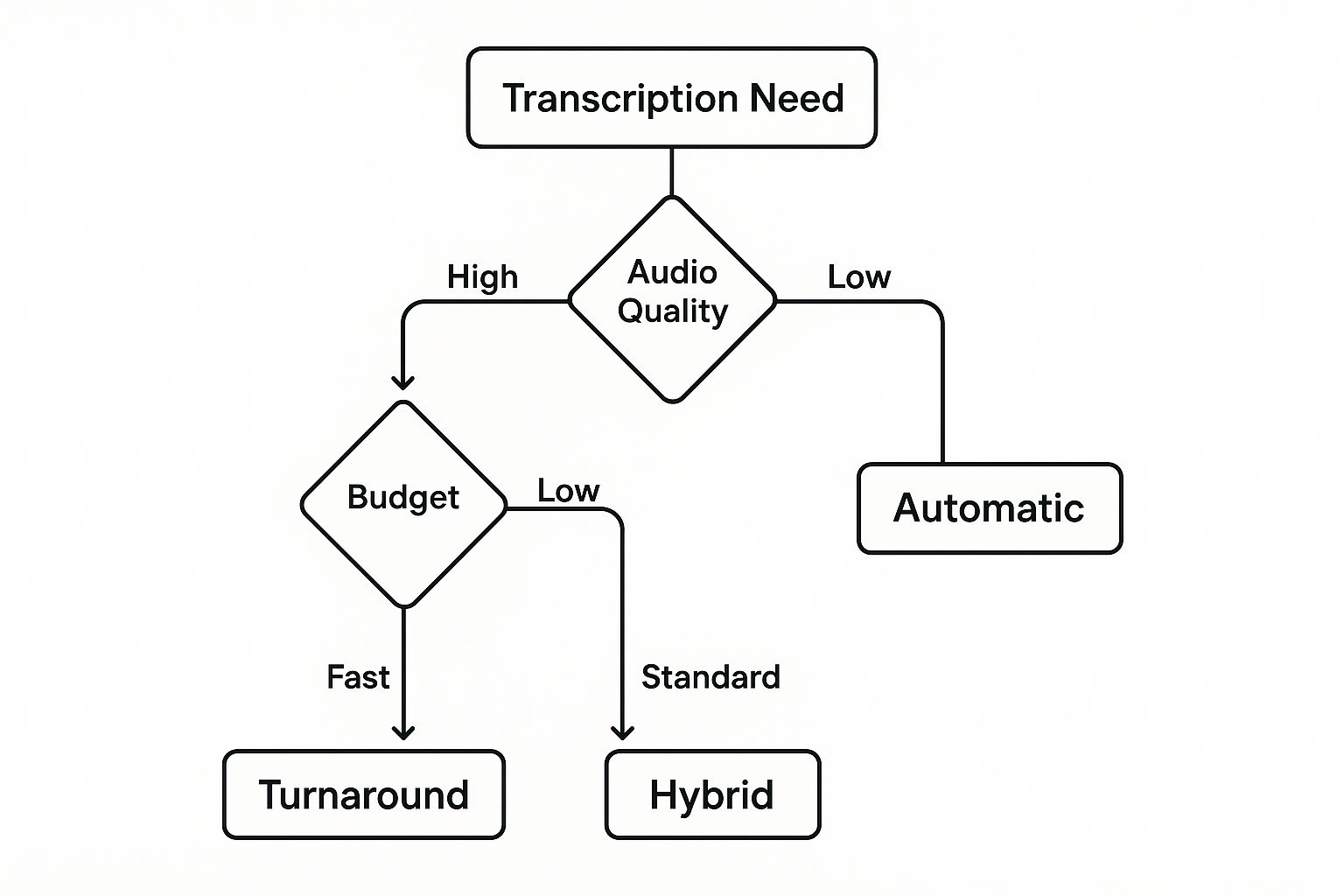
As the infographic shows, the more you need pinpoint accuracy and the messier your audio is, the more you'll want a human involved.
Comparing Transcription Methods
To make it even clearer, here's a side-by-side look at how these methods stack up against each other based on the factors that matter most.
| Method | Best For | Average Accuracy | Typical Cost | Speed | | :--- | :--- | :--- | :--- | :--- | | Manual | Legal, medical, and academic research where precision is paramount. | 99%+ | $1.50 - $5.00 per audio minute | 24-72 hours | | Automated (AI) | Quick drafts, content repurposing, and personal note-taking. | 85% - 95% | $0.10 - $0.50 per audio minute | 5-15 minutes | | Hybrid | Business meetings, interviews, and podcasts needing a balance of speed and high accuracy. | 98%+ | Varies (often a mix) | 4-24 hours |
By weighing these factors—accuracy, cost, and speed—you can confidently pick the transcription method that aligns perfectly with your project's goals and budget.
Getting the Most Out of Automated Transcription Software
Diving into automated audio transcription to text is pretty simple on the surface, but getting a transcript you can actually use without hours of editing takes a little finesse. The secret isn't just about clicking "upload." It's about learning how to work with the software to get the best possible result right from the start.
Honestly, the most important part of the process happens before you even open a transcription tool. It all comes down to the quality of your audio file. AI is smart, but it gets tripped up by the same things we do—background chatter, weird echoes, and multiple people speaking at once. A clean recording is your single best bet for an accurate transcript.
Prepping Your Audio for a Flawless First Draft
I've learned this the hard way: "garbage in, garbage out" is the absolute truth here. Taking just a few minutes to clean up your audio can save you an incredible amount of time correcting mistakes later.
Before you drag and drop that file, run through this quick checklist:
- Kill the Background Noise: Use a basic audio editor to remove that distracting hum from a fan or the faint sound of traffic.
- Level Out the Volume: Make sure all speakers are at a similar volume. This prevents the AI from skipping over someone who was speaking more softly.
- Stick to Standard Formats: Most tools are flexible, but you can never go wrong with a high-quality MP3 or WAV file. They're the universal languages of audio.
This little bit of prep work makes a huge difference in how well the AI can understand and process the speech, giving you a much cleaner transcript to work with.
A Practical Workflow for Transcription
Once your audio is prepped and ready, the process on most platforms is pretty similar. You upload the file, and the AI does its thing. But there are a few features you should absolutely look for to make your life easier.
If you know your recording is full of specific jargon, industry terms, or unique names, find a tool with a custom vocabulary feature. This lets you give the AI a "cheat sheet" of words it might not recognize, which is fantastic for avoiding misspellings of company names or technical terms.
Another game-changer is speaker identification (also called diarization). This feature automatically figures out who is speaking and when, which is a lifesaver for transcribing interviews or multi-person meetings. Instead of a solid block of text, you get a script neatly organized by "Speaker 1" and "Speaker 2." You can see a breakdown of other advanced AI features that can speed things up.
No matter how good the AI is, the final step always needs a human touch. Plan on a final review where you listen to the audio while reading the transcript. This is your chance to catch misheard words, fix punctuation, and smooth out any awkward phrasing. It's how you turn a good-enough draft into a perfect final document.
The demand for these tools is exploding for a reason. The global market is set to hit $2.5 billion in 2025 and is expected to grow by about 15% each year through 2033. This boom is all about making the massive amount of audio content we create every day searchable, accessible, and useful. You can learn more about the trends driving the audio transcription market.
Proven Techniques for High-Accuracy Transcripts
Getting a high-quality transcript has less to do with the software and more to do with what happens before you ever hit the "transcribe" button. The single most important factor for accurate audio transcription to text is the quality of your original recording. It really comes down to the old "garbage in, garbage out" principle—a clean, clear recording is your best friend.
That means focusing on two things above all else: a decent microphone and a quiet recording environment. While your smartphone is fine for a quick note, investing in a dedicated external microphone will make a world of difference. Even an affordable one will capture your voice with much more clarity and far less background noise, which makes the AI's job a whole lot easier.
Setting the Stage for Clear Audio
Before you even think about recording, take a few minutes to prep your space. This simple step can drastically reduce transcription errors and save you a ton of editing time on the back end.
- Find a Quiet Room: Simple, but effective. Shut the doors and windows to block out traffic, hallway conversations, or the hum of the air conditioner. Rooms with soft furnishings, like carpets or curtains, are great for dampening echo.
- Mic Placement is Key: Try to keep the microphone a consistent distance from your mouth. A good starting point is about 6-12 inches away. This helps avoid the muffled sound of being too close or the faint, distant audio of being too far.
- Speak Clearly and Pace Yourself: Take a breath. Enunciate your words and speak at a steady, natural pace. It's also crucial to avoid talking over other people. Overlapping speech is one of the toughest problems for any transcription tool to solve.
Making these small adjustments from the start lays the groundwork for a crisp, intelligible recording that the software can easily understand.
Post-Transcription Proofreading Strategies
Let's be realistic: even with a perfect recording, no automated transcript will be 100% flawless. The final, and most important, step is always a manual review. This is where you transform a pretty good draft into a polished, accurate document you can actually rely on.
Don't just read the transcript—listen to it. Your ears will catch awkward phrases and misheard words that your eyes will skim right over. The most effective proofreading method is to play back the audio while you read along with the text.
Here are a few tips I've picked up to make the editing process faster:
- Slow It Down: Most audio players let you adjust the playback speed. Try listening at 0.75x. This gives your brain more time to catch errors without you having to constantly hit pause and rewind.
- Use "Find and Replace": Notice the AI keeps misspelling a specific name or bit of jargon? For example, if it keeps writing "Jazzy" instead of "Jassy," use the find and replace feature in your editor to fix every instance in one shot.
- Focus on Punctuation: AI is notoriously bad with punctuation, often leaving out commas, periods, or creating massive, unreadable paragraphs. Doing one quick editing pass just for punctuation can dramatically improve the final document's clarity.
Putting Your Transcript to Work
Alright, you've got your finished transcript. Now what? The real magic happens when you realize that text file is more than just a record of what was said—it's a goldmine of reusable content. A single audio recording, when transcribed, can fuel your content calendar for weeks.
Think about a one-hour webinar you just hosted. It doesn't have to live and die as a single video. That transcript is the raw material for so much more.
- Create Epic Blog Posts: Edit and polish the full transcript into a comprehensive "ultimate guide" on the topic.
- Fuel Your Social Media: Pull out the most powerful quotes, surprising stats, or key takeaways and turn them into shareable graphics for Instagram, X, or LinkedIn.
- Develop Lead Magnets: Condense the core lessons into a handy PDF checklist, a quick-start guide, or even a short e-book to capture new leads.
It's all about shifting your mindset. A transcript lets you move from a one-time broadcast (like a webinar) to creating a whole library of targeted assets that can reach your audience wherever they hang out. You're essentially multiplying the value of your original recording effort.
Unlocking Business Insights
Beyond just creating new content, transcripts are incredibly powerful tools for understanding your business on a deeper level. Just imagine the wealth of information sitting in your customer support calls. Transcribing and analyzing these conversations can help you pinpoint recurring problems, understand customer frustrations, and even uncover brilliant ideas for new features.
This isn't a niche practice; it's a huge industry. The U.S. general transcription market was valued at around $32 billion in 2025 and is expected to soar past $50 billion by 2035. This growth isn't just about content—it's driven by the demand for the valuable data locked inside all that audio. You can dig into the numbers in this transcription market analysis.
You can also use transcripts from client interviews to build incredibly authentic case studies and testimonials. Capturing your customer's exact words allows you to tell stories that genuinely connect with new prospects. It's a smart strategy that turns spoken conversations into real business value. This is especially true for creators, where repurposing is a core part of the game. You can see great examples of this strategy in action for content creators.
Got Questions About Transcription? We've Got Answers.
Diving into audio transcription for the first time can feel a bit like learning a new language. You've got questions, and that's completely normal. Let's walk through a few of the most common ones I hear from people just getting started.
First up, the big one: how long does this actually take? With a good AI tool, you can turn an hour of clean audio into a full transcript in roughly 5-10 minutes. It's remarkably fast. For comparison, a seasoned human transcriber would need about four hours to do that same one-hour file, meticulously ensuring every word is perfect.
Dealing With Real-World Audio Challenges
So, what happens when you have more than one person talking over each other? That's where a feature called speaker diarization comes in. Most modern transcription tools can automatically detect different voices and label them as "Speaker 1," "Speaker 2," and so on. This makes it a breeze to go back and replace those generic labels with actual names.
But what about messy audio? We've all been there—recordings with background chatter, wind noise, or a bad mic. Your first move should always be to run the file through an audio cleanup tool if you can. If that's not possible or doesn't fix it, this is where professional human services really shine. They have the training to pick out words an AI would just stumble over. For a deeper dive into these nuances, check out our official transcription documentation.
It's also important to know the difference between "verbatim" and "clean read" transcripts. A verbatim transcript is the raw, unfiltered audio in text form—every "um," "ah," and stutter included. Think legal depositions. A clean read, on the other hand, is lightly edited for readability. It removes all the filler to give you a polished text that's ready for a blog post or meeting notes.
Ready to pull text directly from video content? YouTube Transcript has a free AI tool that can transcribe any public YouTube video in just a few seconds. It even generates summaries, notes, and full scripts. You can try it for yourself at https://youtubetranscripts.org.